DIY FPV lap timer · ESP32-C5
Sits by the gate.
Barks on every lap.
A US$6 ESP32-C5 board listens on your 5.8 GHz video channel and catches the signal peak as you fly through the gate. No RX5808, no extra RF hardware — just lap times on your goggles or your phone.
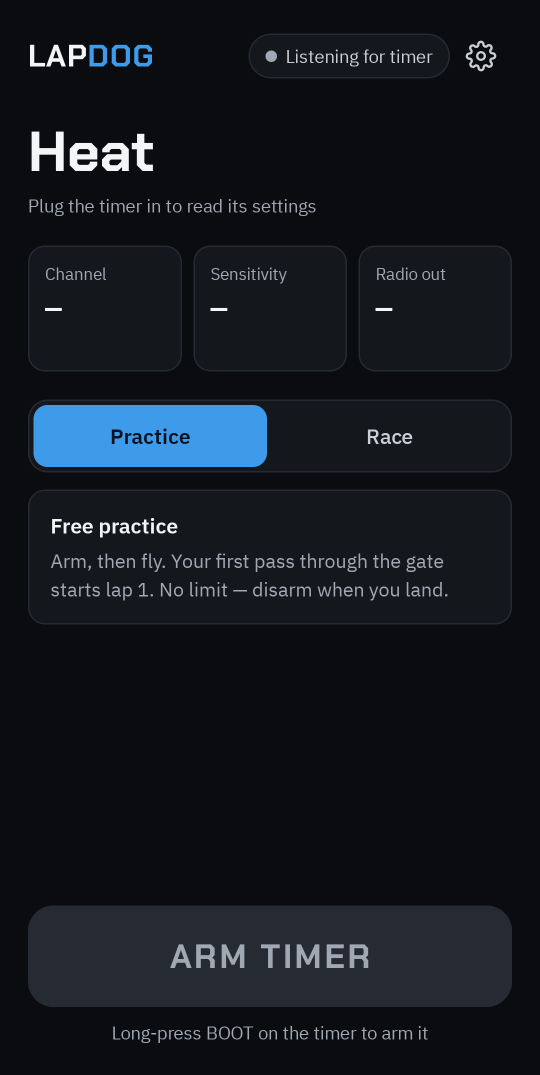
Early days. Firmware, app and protocol are up and tested off-hardware. Next: getting the C5's radio to see the drone fly past.
How it works
-
01
Listen
ESP-SDR turns the C5's own Wi-Fi radio into a software-defined radio, tuned to your VTX channel anywhere from 4.8 to 6.0 GHz.
-
02
Detect
The timer measures power in your channel hundreds of times a second, smooths it, and marks the peak between enter and exit thresholds as a gate pass.
-
03
Bark
Each lap goes out in a short burst — to your goggles' OSD over ESP-NOW, or to the LapDog app over Bluetooth — and always over USB.
Built for practice at home
No RX5808
The whole receiver is the C5's built-in radio. One cheap board, nothing to solder.
Laps in your goggles
Acts as an ELRS Backpack timer, so HDZero goggles and RacePanel show your laps just like a club race day.
Phone app
Android app for live laps, best and average times, and setting up channel, sensitivity and race messages.
Practice or race
Free practice where your first pass starts lap 1, or staged races with ARM NOW, GO!, lap or time limits and auto-numbered heats.
False-read protection
A minimum lap time and a parked-quad rule stop crashes into the gate counting as laps — and you're told when a pass is ignored.
Analog and HDZero
Any fixed 5.8 GHz channel: Raceband, Fatshark, Boscam and Lowband. DJI and Walksnail aren't supported.
Docs
How it works
How a US$6 ESP32-C5 hears your drone fly through the gate, and where the lap times go.
Hardware
What you need to build a LapDog, and what to watch out for.
Firmware
Building and flashing the timer, and its USB console.
Android app
The LapDog companion app — live laps over Bluetooth or USB, and timer settings.
Protocol
The LapDog frame format on USB and Bluetooth, and the ELRS Backpack OSD messages on ESP-NOW.